Make your first picture book
Write the story and chapters
Maintain the story profile and chapter prose, import a draft, generate new versions, and resolve external STORY.md changes.
Lumi separates “what the whole book is about” from “what each chapter says.” The story profile carries characters, goals, conflict, and direction. Chapter prose is the text that later becomes a storyboard.
Refine the story profile
- Open Overview → Story profile.
- Edit the current content or generate a story profile with AI. Adjust the requirements before generation and revise the result afterward.
- Saving creates another content version rather than erasing all history. Restore an earlier candidate when you want to revisit an idea; the restore itself becomes a new version.
- If chapters came first, Lumi can reconstruct a profile from existing chapters. Verify the characters and direction before treating it as current.
Create and edit chapters
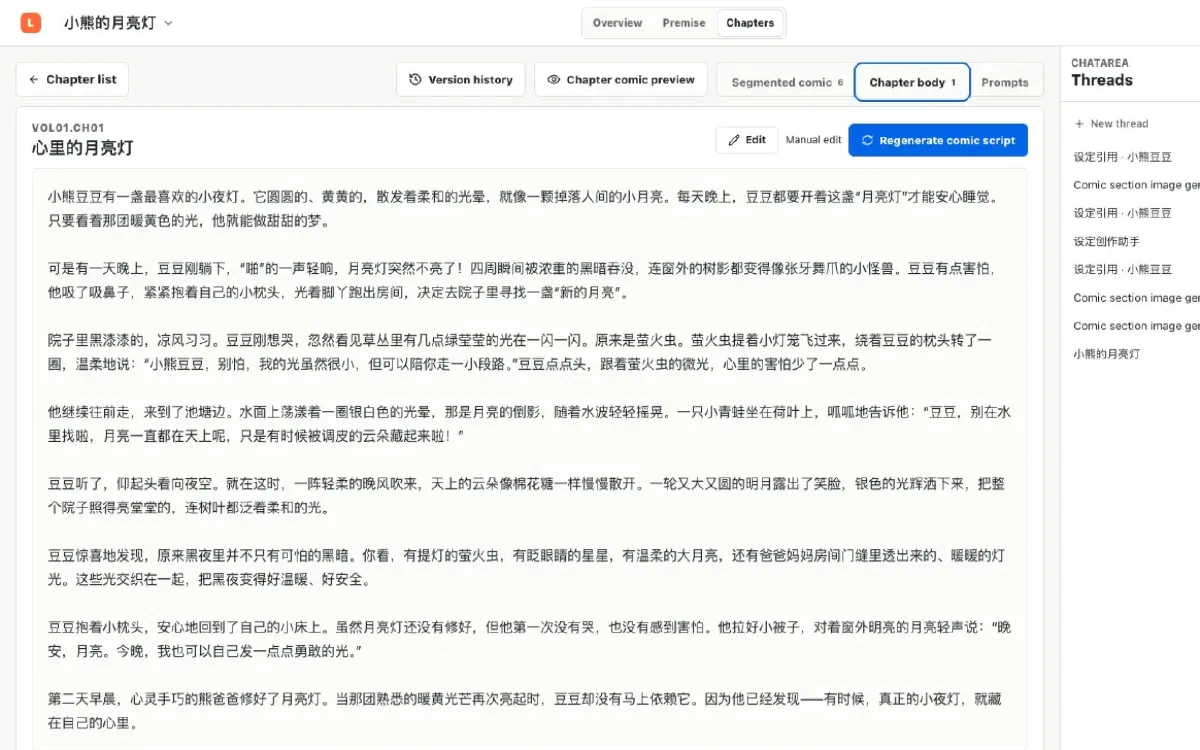
- Open Chapters and create a chapter.
- Enter its title and write in the body editor. Watch the save state and resolve a failure or conflict before leaving.
- Switch to Preview to check the Markdown. Storyboarding benefits more from clear action, setting changes, and dialogue than from complex formatting.
- For chapter generation, write explicit requirements and create a new version. Existing prose does not simply disappear when the task begins.
Import an existing draft
Import TXT or Markdown from the chapter workspace. Before importing:
- Keep one clearly identifiable chapter or story segment per file.
- Use UTF-8 to avoid characters that the app cannot interpret.
- Keep the original file backed up until you verify the imported chapter structure.
Imported text joins the project’s version history and remains editable, previewable, and available for storyboarding.
Plan several chapters or continue the story
Once the profile is stable, plan multiple chapters or generate the next one. State the chapter’s job in the overall story, required turn, approximate length, and desired child-friendly voice. Read the transition when the task completes before adopting or editing it.
Resolve external STORY.md edits
STORY.md is a human-readable projection of the current story profile. You may inspect it in another editor, but Lumi does not silently overwrite an external change:
- Choose “Import as new version” to bring that edit into history.
- Choose “Regenerate from database version” to discard the external change and restore the current formal version.
Next step
When the direction and at least one chapter are stable, open Premise and turn recurring characters, places, and props into visual references.